
EUKLID | Max for Live device for creating euclidean rhythms
EUKLID
Euclidean rhythms you can shape
Do you have hundreds of Ableton Live sets? Check out REKALL the Ableton Live project manager.
Introducing EUKLID, a Max for Live device which builds drum patterns from Euclidean rhythms and prints them straight into a MIDI clip.
A Euclidean rhythm spreads a number of hits as evenly as possible over a number of steps. EUKLID takes this idea further: every pattern can be cut and reshaped by up to two masks, so you can create complex rhythms.
Just highlight a clip (Session and Arrangement View) or clip slot (Session View) and press Print. The pattern is written into the clip as notes, ready to play, edit or drag around.
Three voices
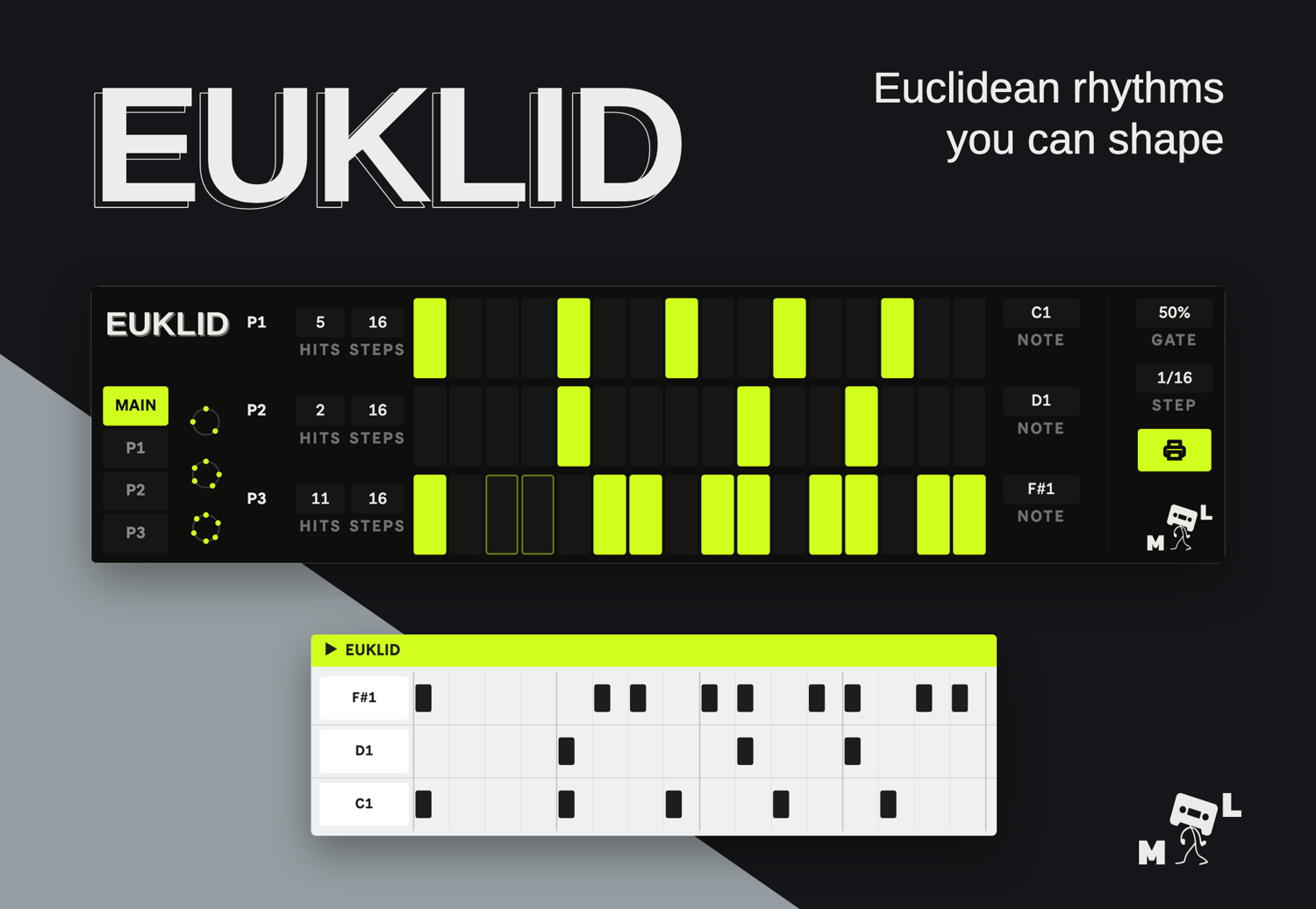
EUKLID has three voices, P1, P2 and P3, each with its own pattern, pitch, velocity, step length and gate. Out of the box they sit on C1, D1 and F#1, the General MIDI kick, snare and closed hihat.
The MAIN tab shows all three voices together. Change the hits, steps and note of each voice right there, and set the step length and gate of all voices at once.
The P1, P2 and P3 tabs open the full editor of one voice.
Masks
Each voice has a base pattern and up to two masks. A mask is a second Euclidean pattern which is combined with the base, step by step:
- AND keeps only the hits that both patterns share
- OR adds the hits of the mask to the base
- XOR keeps the hits that are in one pattern but not in the other
Masks don't need to have the same length as the base. A 4 step mask over a 16 step base stretches across it, so you can thin out a busy hihat or add accents every half bar with two numbers.
f.ex a base of 6 hits over 16 steps, masked with 2 hits over 4 steps using AND, keeps the hits on steps 1, 4, 9 and 12.
Every row can also be rotated, which moves the hits around while keeping the Euclidean spacing, and shifted step by step with the arrows.
Draw your own
Click any step in a lane to add or remove a hit by hand. Click it again to bring back the original.
Print writes into the clip slot which is highlighted in both Session and Arrangement views.
- From the MAIN tab, all three voices are printed
- From a voice tab, only that voice is printed
If the slot is empty, a new clip is created. If it already holds a clip, EUKLID only replaces the notes on the pitches it writes, everything else in the clip stays where it is. Voices with different lengths are repeated to fill the length of the longest one, so polyrhythms line up the way you hear them.
Toggle on Auto Print and the clip is reprinted every time you change something. Tweak a mask while the clip is playing and hear the result straight away.
This is how it works
EUKLID is a M4L MIDI effect, so add it to any MIDI track. Highlight a clip slot on that track, shape your patterns and press Print.
Every control is a Live parameter, so it's saved with your set and can be automated or mapped.
Troubleshooting
#1: Nothing happens when I press Print
Make sure a clip slot is highlighted in Session view, on the same track as EUKLID. If no slot is highlighted, the device shows "select a clip slot".
#2: Is EUKLID working?
To verify that EUKLID works, add it to a new MIDI track, highlight an empty clip slot and press Print from the MAIN tab. You should get a one bar clip with four notes on each of C1, D1 and F#1. If you don't, please reach out.
#3: My hand drawn steps are gone
Steps which you click on by hand are not saved with the set. They are also cleared when you change the hits or steps of that voice. Print the pattern to keep it.
Verified systems
Live 12 Suite
Release notes
Version 1.0.0 - Initial release
Support
Any issues? Contact our support at general@machinelies.eu